
Michael R. Wagner
-
Posts
153 -
Joined
-
Last visited
-
Days Won
1
Content Type
Profiles
Forums
Blogs
Downloads
Everything posted by Michael R. Wagner
-
When I upload information, I get the usual "successful" pop-up window acknowledging my upload. However, if I also have cover scans to submit, when I click "yes" when asked if I want to upload them, I get an error message and it's unclear whether it's just the cover scan(s) that failed to upload, or the issue information, too. Upon closing that error pop-up, I also get another error message saying that the program is unable to assign points to my profile for the data/cover(s) that I submitted. This just started on Jan 1, but continues today (Jan 2). Any thoughts on what's happening? r/MikeW
-
I concur with Steven's assessment. I had a subscription to the old CBG, too. That weekly newspaper was always a high point of the week. r/Mike
-
 I found some separate entries for issues with the Mark Jewelers insert, but there are a lot of titles that do not include them. Should these issues really be listed separately in the database as variants? Doesn't seem like a valid reason for a separate listing. I ask because I have a lot of issues with the MJ insert (purchased when I was living on overseas military installations). Before I change my database to add so many variants, I'd like to hear confirmation that they are, in fact, desired to be in the central database. r/Mike
 -
Big Little Books and Better Little Books
Michael R. Wagner posted a topic in Content and Corrections
Whitman published both series, starting in the 1930s. My (so far) limited research tells me that Better Little Books came second, and possibly as a continuation of Big Little Books, i.e., the name of the series simply changed from "Big" to "Better" - and supposedly the numbering continued without a break. I have some Better Little Books, but they seem to have been publsihed while the Big Little Books were still being published, not later. For example, I have a Better Little Book #1436, "Maximo the Amazing Super-Man" published in 1936. However, the db already has a Big Little Book #1436 and it's "Jack Armstrong and the Ivory Treasure." A review of the books in the db seems to indicate that a Big Little Book is assigned its issue number (e.g., 1436), and a Better Little Book is assigned its issue number with the /A addition. I'd like to get confirmation of this before I add my Better Little Books into the Big Little Book title in the db. r/Mike -
With that in mind, I've just uploaded my cover. It's not 100% complete (book is too big to fit within the edges of my flatbed scanner). I'll upload a more complete version if I can. r/Mike
-
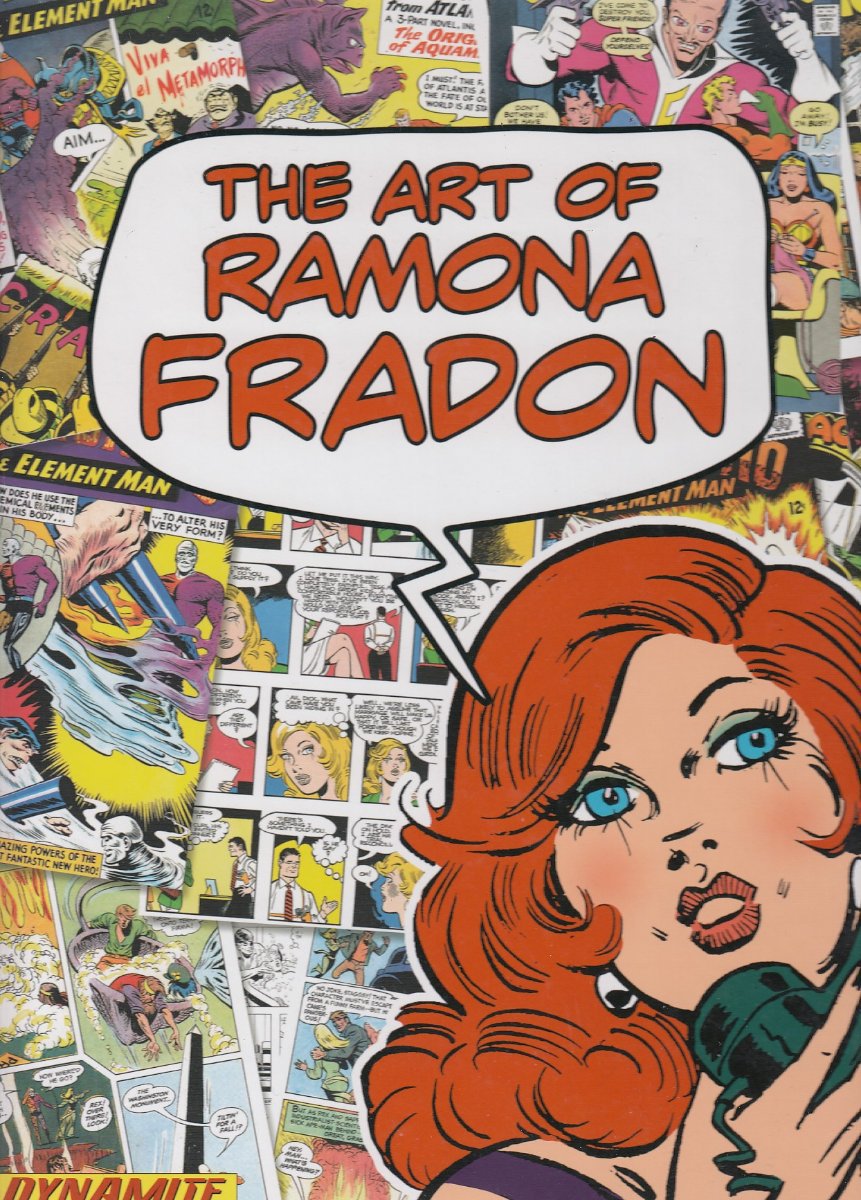
The cover of this hardcover one-shot from Dynamite Press that the database has is different from my copy. I have a first printing edition; it's in full color and the background consists of comic book panels that she created. The db copy has fewer background panels, all the panels are in various shades of red, and the lower left corner includes "Overview by Howard Chaykin." My copy doesn't have that overview. I'm wondering which is "HC" and which is a subsequent(?) printing, which would be identified accordingly. I scanned and attached an image of my copy for comparison and hopefully some assistance. This title entry also has a separate listing for a signed, numbered edition, which I think is a separate issue, as such editions are not consistently entered in the db as separate entries. r/Mike

-
Low run independent comics
Michael R. Wagner replied to Patrick O’Malley's topic in Content and Corrections
Greg, you didn't, by chance, create variant covers for them, did you? 🙂 -
End of the standard cover?
Michael R. Wagner replied to Michael R. Wagner's topic in Content and Corrections
Thanks for the info. -
I see that every DC cover is now a variant, e.g., there is no Batman (3rd series) #136 - closest to it is #136/A. Same for other titles I checked. I guess I missed that announcement. I hope older issues w/ variant covers aren't going to be renumbered to reflect this new numbering preference.
-
Agreed, if that matches the indicia of the new reprint. The first two sentences of your original post led me to believe the indicia of the new reprint is Marvel Masterworks. I apologize if my misunderstanding contributed to any confusion. r/ Mike
-
Greg, the series you propose using was established in the database separate from the Marvel Masterworks series presumably because the indicia was different from the original Masterworks series. It included the name of the character who's stories were reprinted. It made sense to give it its own database entry because of the different indicia. The original series started in 1988, but the second series that is Spider-Man-specific started in 2002. Both series have been there for years - 35 and 21 years, respectively. The current run of Marvel facsimile editions are being correctly placed under the titles they reprint, which are decades old. Starting age of the series shouldn't be any more of an issue than how the cover is presented when it comes to where to list it in the database. Indicia is supposed to be the driving factor. The new reprint volume should go under whichever of the two series has the matching indicia. r/ Mike
-
The Marvel Masterworks (w/o further identification) volume #1 is a Spider-Man volume, reprinting Amazing Spider-Man #1-10 and Amazing Fantasy #15. Is the new volume a reprint of this book? If so, the title should be "Marvel Masterworks" without the ": The Amazing Spider-Man" and it would be appropriately listed under the Marvel Masterworks series of hardcover books, since it's a reprint of the first volume of that series. r/ Mike
-
The db lists this issue as a $0.15 variant, but with a publishing date of 11/1/2011. I don't recall #2 ever being reprinted, in 2011 or any other year. Correction needed? -Mike
-
Thank you, sir!
-
Solid customer support has been Pete's standard for as far back as I can remember - and I've been a subscriber since the first Windows-based version was released. -Mike
-
Correct, no colon marks.
-
Any chance of correcting the title of this one-shot to match the indicia? It should be "Dawn of DC We are Legends Special Edition."
-
column for notable items in comics?
Michael R. Wagner replied to Richard R. Scott's topic in Feature Suggestions
The Cosmic Cube is a good example, i.e., I track the appearance of a lot of such items in my database (Fortress of Solitude, Flying Newsroom, Phantom Zone ray projector, et al). I place them in the 'Appearance' field. Just have to refrain from submitting that particular issue update to the master database. This works for me because I don't let the weekly update overwrite that field. A while back I started using one of the custom fields for that purpose (as Mark suggests) and might eventually transfer all such object appearances to that custom field. The 'appearance' field works fine for this, subject to the restrictions I described. r/Mike -
Recommend this issue be removed from the database. It's an erroneous duplicate of issue #2. r/Mike
-
Yep, and that's part of the mystery. I never opened this title in my db before today, and have none of the issues, i.e., qty for every one is, and has been, 0. Somewhere along the way I guess an update created them, and no update ever undid the error.
-
Here's another possible redundancy error in the database. There are eight entries for issue #0.5 in the database. Five are entered as something other than a regular issue. The three regular issues show the same cover and have matching data. My copy has this cover, but with "Special Wizard Edition" stamped in gold foil on the cover, in the space next to the left hand. I don't know about the five "special" issues, but the three regular 0.5 issues appear to be redundant, and none have the special release cover (w/ COA) that I have. I'd like to replace the cover of one of these, but which one to replace? r/Mike
-
Similar to my earlier post about seemingly identical multiple entries for the Wizard issue 1/2 giveaway for Doom's IV, I find three seemingly identical entries for the Wizard giveaway for The Maxx. There are actually seven entries, and three of these additional four entries also appear to be identical to each other. r/Mike
-
I'd like to add my copy of the Wizard #1/2 issue, distributed "in a special protective holder" with a COA, but not sure how the three DB entries of issue #0.5 differ from each other. I didn't know there were three variations of this issue. I couldn't find any difference in the data for each of the three; it appears the database simply has redundant copies. Yes? r/Mike
-
I added this title and its first issue, but without historical pricing data - I can't find any records of prices paid for these issues on the after-market. Does anyone have pricing data to add? r/Mike
-
There is a link at the bottom of the email that you can use to turn off receiving such queries.