Skip to content
View in the app

A better way to browse. Learn more.

ComicBase User Community

A full-screen app on your home screen with push notifications, badges and more.

To install this app on iOS and iPadOS
  1. Tap the Share icon in Safari
  2. Scroll the menu and tap Add to Home Screen.
  3. Tap Add in the top-right corner.
To install this app on Android
  1. Tap the 3-dot menu (⋮) in the top-right corner of the browser.
  2. Tap Add to Home screen or Install app.
  3. Confirm by tapping Install.

Clean up for 04/06/2023 content update

Featured Replies

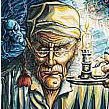
One of last week's content updates added the title Dan Panosian: Urban Barbarian Collected Works.  A couple of notes on this:

•  The indicia uses a dash rather than a colon.  

•  The database lists a single item under this title, an unnumbered hardcover.  Although it is true that the hardcover doesn't bear a volume number, there is also a "volume 2" for this title that is a trade paperback.  So I am proposing that what is currently listed as "HC" under this title be changed to "HC 1" and that "TPB 2" be added.  

  • Author

I have a copy of TPB 2 (I received it and HC 1 from the recent Zoop campaign), but I haven't had a chance yet to scan it or enter any of the info into my database for submission.   I will try to get to that this week.  

Create an account or sign in to comment

Account

Navigation

Search

Search

Configure browser push notifications

Chrome (Android)
  1. Tap the lock icon next to the address bar.
  2. Tap Permissions → Notifications.
  3. Adjust your preference.
Chrome (Desktop)
  1. Click the padlock icon in the address bar.
  2. Select Site settings.
  3. Find Notifications and adjust your preference.