Andrew d’Entremont
-
Posts
280 -
Joined
-
Last visited
-
Days Won
10
Content Type
Profiles
Forums
Blogs
Downloads
Everything posted by Andrew d’Entremont
-
 I've submitted corrections to this title twice now over the last several months but they do not appear to have been accepted. The corrections involved the credits as they are wildly inaccurate. I'd like to re-submit the corrections but I really don't want to take the time to update all the credits yet again if they are just going to be wiped out again. Can you tell me why the corrections I submitted are not being accepted? I am pulling all the information straight from the credits in the actual comic.
 -
Item Lookup for Books and Magazines
Andrew d’Entremont replied to Andrew d’Entremont's topic in ComicBase Mobile
With a new version of CB launching, will we see an update to the mobile app as well? It would really be nice to be able to lookup all the items that have been moved out of the Comic Book category. Thanks! -
For what it’s worth, I was able to download a cover earlier today.
-
Were there other issues? I was entering some new comics last night and could not download new cover images. I kept getting error messages.
-
Thanks. I've only seen issues from the first two Aircel series in the wild so it's difficult to know what's what.
-
I was going through the most recent Unrecognized Comics in my collection and noticed that issues 4-7 of Elflord (5th Series) are no longer recognized. I don't have the issues on hand to verify that they exist, but at least three separate sources online list them. Both MyComicShop and Mile High list it (probably incorrectly) as Elflord Cuts Loose, and they all have 7 issues. Comicvine also lists all 7 issues for this volume: https://comicvine.gamespot.com/elflord/4050-58016/ I also noticed that the Publisher is listed as Night Wynd but the cover scans clearly show the Warp logo. Any clarification would be appreciated as Elflord is one of the titles I have on my "wish list" for completing one day. Thanks!
-
Removing a database from "My Comics"
Andrew d’Entremont replied to Andrew d’Entremont's topic in Tech Support
Excellent, thanks. You're on fire today! -
I accidently created a new database a while back, and even though I have removed it from the list of databases to use it still shows up online under "My Comics". Is there a way to remove from there? ComicBase Mobile always defaults to this empty database when I open it and it's kind of annoying. It's just a minor inconvenience but it would be nice if I could remove it. Thanks!
-
Well that makes more sense. I knew this was a feature but for some reason I thought I could tweak the settings in Sidekick. No wonder I couldn't find it! I unchecked it and it seems to have solved the problem. It's still a little strange that it keeps downloading the smaller image though. Thanks for all the quick feedback guys!
-
So I closed ComicBase, unchecked the appropriate boxes and it's still happening. It's the weirdest thing. Up ubtil now I've never had an issue adding or replacing a cover.

-
I haven't actually installed new covers in years. I have a lot of cover images that I scanned in myself that are much higher resolution than what is available to me as an Archive Edition user. Yes, I do have it checked. The pictures I was trying to add were definitely bigger than the existing cover. As soon as I hit "Replace" it will briefly change and then the old image will get re-downloaded. I don't even have time to run the Advanced Find you suggested.
-
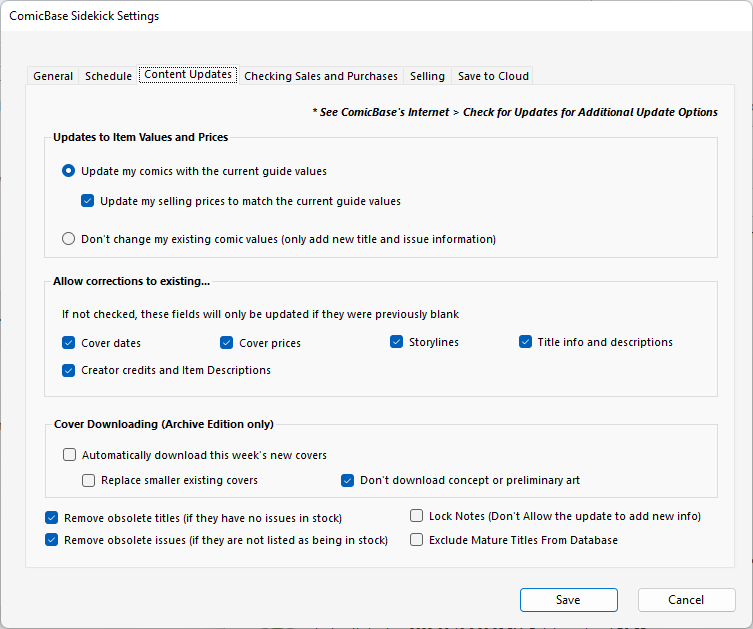
I'm not even sure where to find the Quick Start settings. I just set everything through Sidekick.
-
The thing is, I’m not trying to upload new covers. I’m just trying to add new covers locally so that I can print out ID labels with accurate covers. For the two covers I mentioned they just keep getting replaced by the old covers when I highlight the row for printing. It’s very strange.
-
Actually, I had the same problem with another issue. Dark Knights of Steel #7 will not update with the new cover image I add.
-
I just added my last two weeks of comics and noticed Where Starships Go To Die #1 has an incorrect cover image. I tried replacing it with the usual drag and drop method but the changes just won't stick. As soon as I click on the cover in ComicBase it downloads the old version. I also tried deleting the incorrect cover directly from the picture folder and pasting in the correct image but the same thing happens. I even kept the picture folder open as I clicked on the cover in ComicBase to see what happens and I can watch my new cover image being overwritten with the old, incorrect image. I've never seen this happen before. Is there a way to correct this? Also of note, I noticed a lot of the covers I had for my comics this week contained preliminary artwork despite the fact that I have "Don't download concept or preliminary art" ticked off under content update settings. And funnily enough, I had no problem replacing these covers with updated images like I did with Where Starships go to Die. I'm running ComicBase 2022 Archive Edition c22.0.2.1708
-
Item Lookup for Books and Magazines
Andrew d’Entremont replied to Andrew d’Entremont's topic in ComicBase Mobile
Okay. Thanks for the update. -
Item Lookup for Books and Magazines
Andrew d’Entremont replied to Andrew d’Entremont's topic in ComicBase Mobile
Any word on if this may be coming anytime soon? Thanks! -
Thanks for all your help. I have an invoice with a list of all the comics I purchased so it won’t be too much trouble to print barcodes.
-
Well I added the last two weeks of comics from my full list using my barcode scanner and the date modified has many different values. Here are just a few samples. Batman (3rd series) #122: 2022-04-13 Batman Killing Time #2: 2022-03-03 Last Flight Out: 2022-04-13 Little Monsters (Image) #2: 2022-04-08 Superman Son of Kal-El #10: 2022-03-17 Wonder Woman Historia #2: 2022-04-03
-
Okay, I think I know why nothing turned up in a search. I added the "Date Modified" as a column to view and looked at a few of the comics I added and it looks like the Date Modified might correspond to when they were added via a content update.
-
Thanks. That's a good suggestion. Unfortunately I can't seem to turn up any results using this search string, and I don't know enough about it to troubleshoot.
-
Thanks. The files in the dropbox link had an older version of Crystal Reports than was installed on my system so I just I ended up following the instructions that popped up and it's working again. It wasn't as painful as I thought it would be. Of course now I have to go to each comic I just added in the last batch individually to print barcode labels for them. I know, I know, first world problems...
-
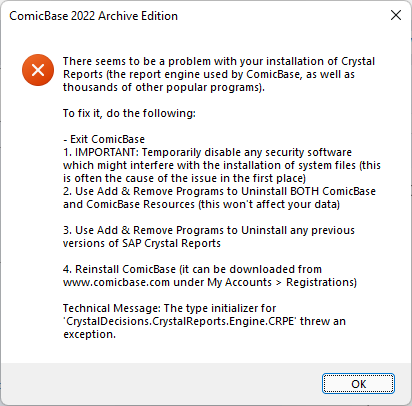
I was just entering some comics into my database tonight using my barcode scanner, and after entering them I went to go print barcode labels as I usually do by pressing F6, but when I hit print I was presented with the following error: Uninstalling everything seems a bit drastic. Is there no other way to fix this error?
-
I just noticed that Knightmare from Image is listed as having issues from 0 to 8, but I'm pretty sure issues 6-8 do not exist.
-
Update and Cover Download Problems
Andrew d’Entremont replied to Andrew d’Entremont's topic in Tech Support
Okay, I fixed the update issue. I closed ComicBase and tried to update from Sidekick instead and I noticed that it started trying to read titles right away and didn't download the update first. Sure enough the updated failed again, but this time Sidekick provided me an error message that included a filename. I suspect the update got corrupted somehow so I deleted the temporary file and initiated another update and this time it worked. Cover downloads seem to be working properly at the moment as well, so maybe I jumped the gun in opening this thread.